Static Routes
This option enables you to add or remove static route rules. Static routes are usually only used in conjunction with /etc/defaultrouter. Static routes may be required for network topology, where you don’t want to traverse your default Gateway/Router. In this case, you will probably wish to make the routes permanent by adding the static routing rules. Static routes can be added with both IPv4 and IPv6 addresses.
|
➢
|
To configure static routes: |
|
1.
|
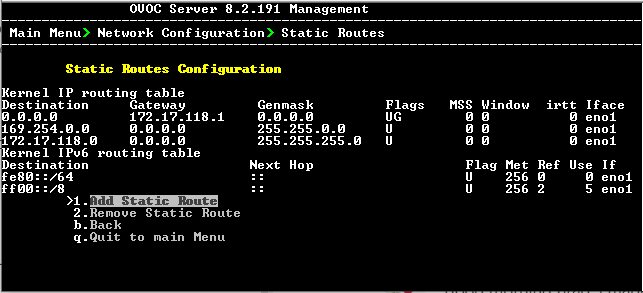
From the Network Configuration menu, choose Static Routes, and then press Enter. |
Routing Table and Menu
|
2.
|
From the Static Routes configuration screen, choose one of the following options: |
|
1.
|
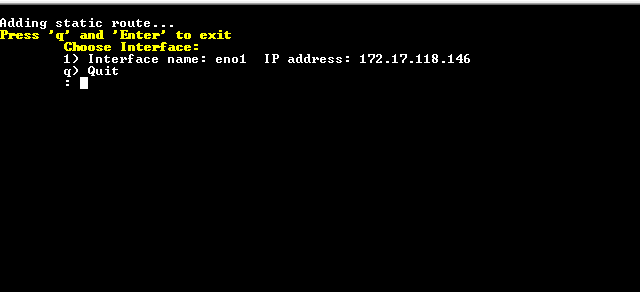
From the Static Routes menu, choose option 1, and then press Enter. |
Select Interface
|
2.
|
Enter the number corresponding to the desired interface, and then press Enter. |
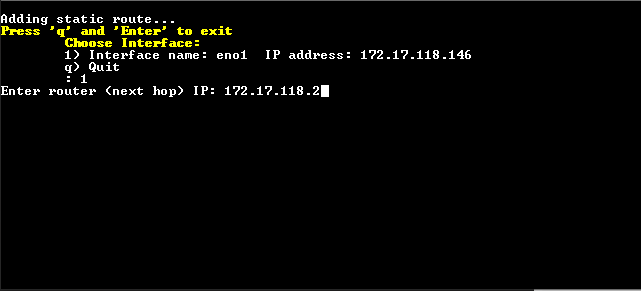
Enter Router (next hop)
|
3.
|
Enter the Router IP address, and then press Enter. |
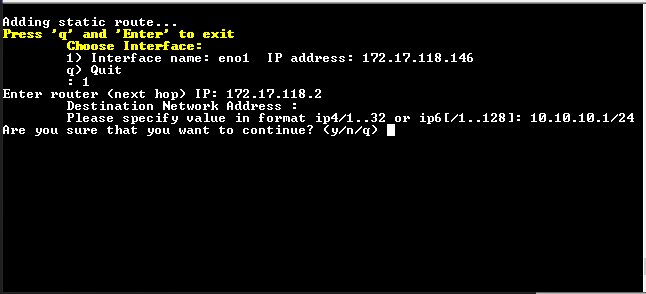
Destination Network Address

|
4.
|
Enter the Destination Network Address in specified format, and then press Enter. |
Confirm New IP Address
|
5.
|
Enter y to confirm the new IP address, and then press Enter. |
|
➢
|
To remove a static route: |
|
1.
|
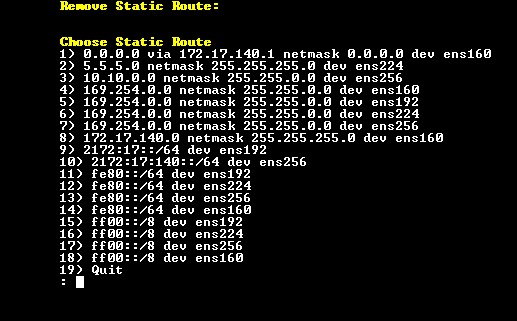
From the Static Routes menu, choose option 2, and then press Enter. |
Remove Static Route
|
2.
|
Enter the number of the static route that you wish to remove, and then press Enter. |